GIMP Inkscape 2.8.14.27
by
Hi, here you can download APK file "GIMP Inkscape" for free, apk file version is 2.8.14.27 to download to your android just click this button. It's easy and warranty. We provide only original apk files


This app is not updated anymore, at least not until I will get a new phone.
Two graphics editors, ported from PC. You will need mouse, stylus, or 10” screen to use them.
This app requires 1 Gb device storage (1.8 Gb during installation), and cannot be moved to SD card.
GIMP is an advanced picture editor, suitable for such tasks as photo retouching, image composition and image authoring.
Inkscape is a vector graphics editor, which has everything needed to create professional-quality computer art.
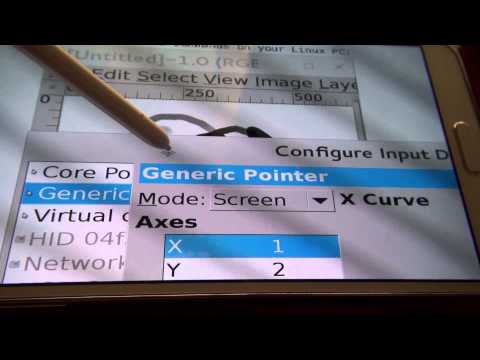
They both support stylus pressure. In Inkscape, you will need to enable Android touchscreen in File → Input Devices (see screenshots).
For best results, also enable Windows → Single Window Mode in GIMP.
Press Back key to show keyboard.
To send right mouse click - touch screen with two fingers, or press a button on your stylus.
To send middle mouse click - touch screen with three fingers, this will drag/scroll image in Gimp.
If you have Menu key, you can use it to undo last action.
If Open or Save dialog is frozen - open the keyboard using Back key, and press Enter or Esc key, you have to do that only once. If your keyboard does not have Esc key - install Hacker's Keyboard.
Finger hover is supported. If you have Galaxy S4/S5 or Note 3/4, enable AirView in system settings to use it.
To make all buttons bigger, and make it draw faster, select smaller display resolution during app start.
If you have Error -24 when installing this app - install this version (it's the same app with different name):
http://sourceforge.net/projects/libsdl-android/files/apk/XServer-XSDL/GIMP-Inkscape-zz-2.8.14.25.apk
Do not uninstall this app if you have Android 4.4 or older - you will not be able to install it again, because of a bug in Android, which was fixed in Android 5.0.
Clear app data instead to save space - long-press app icon in drawer, drag it to App Info icon, and select Clear data.
To add fonts, copy them to directory Android/data/org.gimp.inkscape/files/gimp/fonts on your SD card.
To disable gyroscope, tap Change device config during app start, select Mouse emulation → Advanced → Gyroscope.
To set 24bpp color depth or portrait screen orientation, go to Change device config → Video.
To use dark color theme - double-click Root terminal icon on desktop, and type commands:
apt-get update
apt-get install murrine-themes
Confirm installation, then open Menu → Settings → Appearance, and select NOX theme.
Installing Debian packages with apt-get or dpkg does not work on Android 6.0 Marshmallow or newer.
Sources: https://github.com/pelya/commandergenius/tree/sdl_android/project/jni/application/xserver-gimp


